A lot of teams are learning the same lesson at the same time: the model is not the hard part.
The hard part is what happens after the model makes a decision. Who approves it? What if an API fails? What if the workflow needs a handoff to finance, legal, or operations? Most AI workflow failures happen not because the model is wrong, but because the system has no clear place for approval, retry, or escalation.
That is why the simplest production AI workflow is usually not a fully autonomous agent. It is a carefully orchestrated system with explicit states, tool boundaries, and human approval points. If you are building AI development services or internal AI automation services, this is the design pattern that keeps the system useful instead of fragile.
Why orchestration matters more than autonomy
A demo can look impressive with one prompt and one tool call. Production is different.
In real workflows, the system must survive:
- partial data
- permission checks
- timeouts
- exceptions
- manual review
- audit requirements
- changing business rules
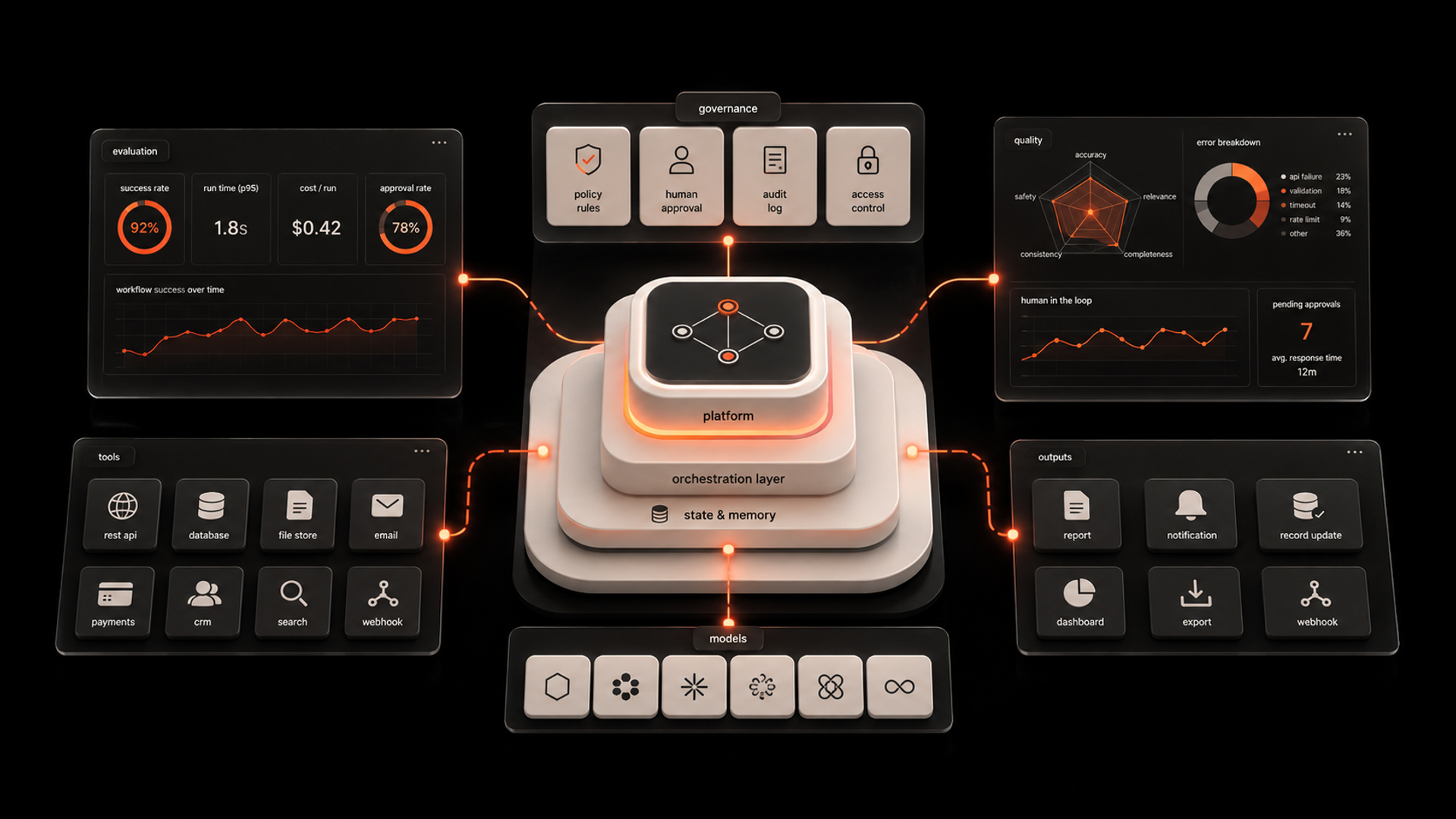
This is where orchestration becomes the real product. A good orchestration layer decides what happens next, not just what the model should say.
LangGraph is useful here because it gives developers a way to model workflow state as a graph. That means you can define branches, loops, checkpoints, and approval gates instead of relying on a single long-running agent prompt. When paired with API tools, the result is a system that can execute work, pause for review, and continue only when conditions are met.
For business owners and operators, this is the practical middle ground. You do not need full autonomy to get value. You need predictable automation with controlled decision points.
The simplest production pattern: state, tools, approval
If you are asking, “What is the simplest architecture for this workflow?” the answer is usually this:
- Receive a request
- Classify the task
- Collect context
- Call tools through approved APIs
- Pause for human approval when needed
- Execute the final action
- Log the outcome and exceptions
That structure sounds simple because it is. But it works because each step has a job.
1) State
The workflow needs a clear state object. This state should hold the request, relevant context, tool results, approval status, and error information. Without state, the workflow becomes a chain of guesses.
2) Tools
The model should not touch systems directly. It should call wrapper functions or API services that expose only the actions you want it to take. This is where safe integration starts.
3) Approval
Any action with business risk should pause before execution. That might mean sending a Slack message, opening a queue item, or asking for approval in a web app. The important part is that approval is not an afterthought. It is a first-class step in the graph.
4) Retry and escalation
When a tool fails, the workflow should know whether to retry, route to a human, or stop. This is where many AI automation systems break down. They assume success. Production systems assume failure and design for it.
5) Audit trail
Every action should be traceable. Who approved it? What tool ran? What data changed? This matters for ops, compliance, and debugging.
If you are evaluating AI development services, ask whether the proposed architecture can do these five things cleanly. If not, it is probably too early to automate the workflow end to end.
LangGraph workflow architecture: what to build and what to avoid
LangGraph workflow architecture is strongest when the workflow has repeated decision points, branching logic, or human oversight.
Good use cases include:
- content approval before publishing
- purchase requests with finance review
- customer support escalation
- CRM updates that need validation
- contract review with legal sign-off
- internal research that ends in a human decision
These are not “agentic” in the hype sense. They are operational workflows with judgment built in.
What to avoid:
- open-ended agents with no task boundary
- workflows that can trigger irreversible actions without review
- direct database writes from model output
- API calls with loose or missing schemas
- systems where the prompt is the main control mechanism
A common mistake is to ask the model to “figure it out” and then trust the result across multiple systems. That is not orchestration. That is delegation without guardrails.
A better pattern is to let the model reason, but force the system to decide through explicit rules. In practice, that means:
- the model proposes
- the workflow validates
- a human approves when required
- the API executes
That sequence is much easier to operate than a black-box agent.
How to connect tools safely
A safe tool layer is less about clever prompts and more about system design.
Use these rules:
Keep tools narrow
Each tool should do one thing well. For example, separate create_invoice, send_invoice, and approve_invoice instead of exposing one broad finance tool.
Validate inputs before execution
Do not pass raw model output into APIs. Convert outputs into structured fields, validate them, and reject anything malformed.
Use permissions by action, not by model
The model should never have broad system access just because it can reason. Grant access at the tool level, and scope each tool to the smallest action set possible.
Add human approval before sensitive actions
This is especially important for payments, external messaging, record deletion, and customer-facing changes.
Log every step
Logs should capture inputs, outputs, approval events, and error states. If a workflow breaks, the log should tell you where and why.
This is the difference between a prototype and an operational system. It is also why AI automation services should be judged on integration quality, not just on whether the model seems intelligent.
What this means in practice
In practice, the best teams are not asking, “Can we make the agent autonomous?”
They are asking:
- Where does the workflow need judgment?
- Which steps can be automated safely?
- Where should the system pause?
- What actions require approval?
- What happens when a tool fails?
That is a better design brief.
For example, imagine an internal procurement flow. The model can summarize a request, check the policy, and draft the approval note. But it should not finalize the purchase order without a human review if the amount crosses a threshold. LangGraph is useful because it can route that request through different paths based on rules and state.
Or take customer support. The model can classify the issue, draft a response, and suggest the next action. But if the issue involves a refund above a set limit, the workflow can pause and send the case to a manager. That is useful automation without surrendering control.
This is also where many teams overbuild. They spend months trying to create a universal agent when the real need is a dependable workflow with a few decision points. The operational win comes from reducing manual effort while keeping the business in control.
If you are building this capability internally, Kumi Studio’s AI Development Services are designed for exactly this kind of implementation: practical workflow design, tool orchestration, and systems that fit how your team already works.
A step-by-step framework for builders
If you want to implement this pattern, use this sequence:
Step 1: Map the workflow
Write down the exact business process. Identify inputs, outputs, decision points, exceptions, and approvals.
Step 2: Separate judgment from execution
Decide what the model should reason about and what the system should do automatically. These are not the same thing.
Step 3: Design the state graph
Model the workflow as states and transitions. Include branches for approval, retry, failure, and escalation.
Step 4: Wrap every external system
Use API wrappers for email, CRM, ticketing, billing, or internal services. Keep the model away from raw system access.
Step 5: Add human checkpoints
Insert approval points where business risk is real. Make them visible and easy to respond to.
Step 6: Test failure paths
Do not only test happy paths. Test tool failures, missing data, slow responses, and rejected approvals.
Step 7: Ship a narrow first version
Start with one workflow and one business outcome. Expand only after the orchestration is stable.
This is the point where many teams benefit from outside help. If you need to move faster, AI Automation Services can help translate this framework into a working operating process, not just a prototype.
Key takeaways
- The simplest production AI workflow is usually a controlled graph, not a fully autonomous agent.
- Safe automation depends on state, tool boundaries, approval steps, and logging.
- The right orchestration pattern reduces operational risk while still saving time.
Related reading
If you are choosing between more autonomy and more control, start with control. The workflow will tell you where judgment is needed. If you want help designing the orchestration layer, contact Kumi Studio and we can help you turn the workflow into something your team can actually run.