A lot of AI automation fails for a simple reason: it is built like a chat demo, not like an operations system.
That becomes obvious the first time a payment fails, a CRM record is missing, a customer replies late, or a human needs to approve something before work continues. The best AI automation systems do not start with prompts. They start with events.
For developers building ai automation services, the more reliable pattern is usually event-driven architecture: explicit triggers, queued work, retries, fallbacks, and exception handling. That design is often a better fit than a synchronous agent loop because real operations are delayed, partial, and messy. If you are building ai development services or custom ai application development for business workflows, this is the difference between a prototype and a system people can trust.
Why event-driven design fits real workflows
Founders often ask for “an AI agent that handles the workflow.” Operators hear that and think: what happens when the workflow breaks?
That question matters because operational work is not one clean request at a time. It is a chain of events.
A lead comes in. A record is enriched. A pricing rule is checked. A human approves a discount. A notification is sent. A task waits on an external system.
Each step can fail independently. Each step may need to wait. Each step may need a human decision.
That is why event-driven systems are stronger than chat-first designs for business automation. A chat interface is useful for interaction. It is not enough for orchestration. When the system is event-driven, you can make state visible, store each transition, and handle exceptions without losing the thread.
This is also where current platform shifts matter. Vendors are increasingly framing agent platforms around orchestration and governance, not just model access. That is a sign the market is moving from “ask the model” to “run the workflow.”
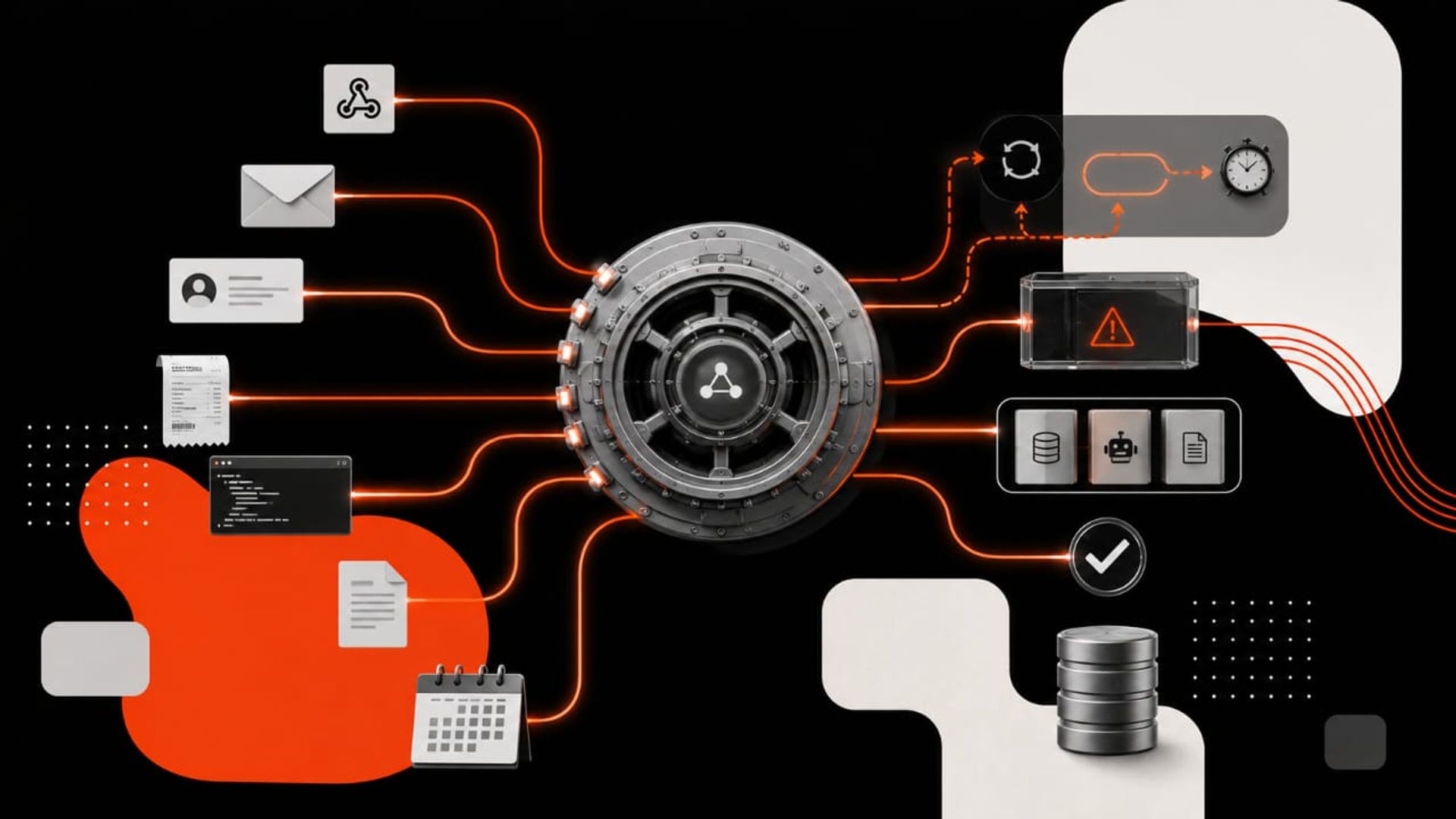
The core architecture: triggers, queues, workers, and exception paths
If you are building this from scratch, keep the architecture simple.
1. Triggers start the workflow
A trigger is any event that should cause action:
- a new support ticket
- a form submission
- a webhook from Stripe, HubSpot, or Slack
- a status change in your database
- a scheduled check
Do not bury the trigger inside a prompt. Make it explicit.
2. Queue the work
Once a trigger arrives, put the task in a queue.
Queues protect you from spikes, slow APIs, and temporary outages. They also let you pause, retry, and monitor jobs without losing control. For operational AI, that matters more than raw speed.
3. Use workers for each job type
Workers process queued tasks. A worker may:
- extract data
- call an LLM
- query a database
- update a CRM
- send a message
- escalate to a human
Keep workers narrow. One worker should do one job well.
4. Record state at every step
Every event should produce a visible state change:
- received
- processing
- pending approval
- failed
- retried
- completed
This state model is what makes the system debuggable. It also gives operators confidence that the automation is not “doing something in the background” without traceability.
5. Design exception paths first
This is where most teams get it wrong.
You need a plan for:
- missing data
- low-confidence model output
- tool errors
- duplicate events
- timeouts
- human approval
- partial completion
Exception handling is not a cleanup task. It is part of the workflow design.
A practical framework for developers
If you are deciding how to build the system, use this sequence.
Step 1: Map the workflow as events, not prompts
Write the process as a chain of state changes.
Ask:
- What starts this workflow?
- What data is required?
- What actions are automated?
- What needs human review?
- What can fail?
- What should happen if it fails twice?
If you cannot describe the process as events, it is not ready for automation.
Step 2: Separate decisioning from execution
The model should not be responsible for everything.
Use the LLM where judgment is needed:
- classifying requests
- summarizing context
- drafting responses
- selecting a next step
Use deterministic code for:
- routing
- validations
- retries
- permissions
- audit logs
- final writes to systems of record
This separation is what makes multi agent systems development safer in production. The agents can help decide, but the workflow engine should control the state.
Step 3: Add guardrails before scale
Before you scale the system, define:
- confidence thresholds
- allowed tool actions
- approval rules
- fallback content
- retry limits
- dead-letter handling
If the model is unsure, the system should know how to stop, escalate, or ask for help.
Step 4: Instrument everything
You cannot improve what you cannot see.
Log:
- event source
- payload version
- tool calls
- model output
- retry count
- exception reason
- final outcome
This matters for debugging, compliance, and service quality. It is also what buyers expect when they invest in ai automation services.
What this means in practice
The best way to think about this is to stop asking, “Can the agent do the task?”
Ask instead: “Can the system complete the workflow under real conditions?”
That shift changes the product.
A support automation system should not just draft replies. It should:
- detect ticket type
- queue the right action
- check account context
- draft a response
- route edge cases to a human
- log the decision
A finance workflow should not just extract invoice data. It should:
- validate fields
- compare against rules
- flag mismatches
- request approval if needed
- create a traceable record
A sales ops workflow should not just enrich leads. It should:
- trigger on form fill
- deduplicate records
- enrich data
- score the lead
- assign ownership
- create fallback actions when enrichment fails
This is the practical value of event-driven design: it turns AI from a clever interface into an operational layer.
For business owners, that means fewer brittle automations that break on edge cases. For operators, it means clearer control over process quality. For developers, it means a system that can survive real-world variance.
If your team is exploring ai development services, this is the architectural conversation worth having early. It is much easier to design for exceptions on day one than to patch them after the workflow is live.
What to build first
The simplest useful architecture is usually:
- one event source
- one queue
- one worker service
- one decision layer
- one exception path
- one human review route
That is enough to support many production workflows.
A strong first build is often not a full autonomous agent. It is a workflow system with targeted AI at decision points. That may sound less exciting than a “fully autonomous agent,” but it is far more useful.
This is also the right entry point for teams considering custom ai application development. The goal is not to impress with autonomy. The goal is to reduce manual work without losing reliability.
If you need a partner to design that system, Kumi Studio’s AI Development Services page is the right place to start.
Key takeaways
- Event-driven architecture is usually a better fit for AI automation than a chat-first or monolithic agent model.
- Triggers, queues, retries, and exception paths should be designed explicitly, not added later.
- The safest production pattern is to let AI help decide while deterministic code controls execution.
Related reading
If you are designing AI automation for a real operational workflow, Kumi Studio can help you turn the idea into a system that works in production. Contact us to discuss the workflow, the edge cases, and the build path.